

When you replace a printed stub with a barcode, one scan gets a guest in. At a local music festival, that cut entry times by two thirds. You can set this up in minutes, no code needed, with custom branding that fits your event’s style—and flat fees with secure payouts to your account.
Why Barcodes Power Ticketing
Imagine tickets that carry more than a row or seat number. Data-rich QR and PDF417 codes let you pack in extra details. In the early nineties, PDF417 and other two-dimensional formats showed up on tickets. By mid-decade, airlines scanned documents in under a second and saved millions of dollars each year. If you want the full timeline, check A2B Tracking.
When one music festival swapped tear-off stubs for dynamic barcodes, lines fell from ninety minutes to thirty. Guests zipped through gates while organizers watched real-time scans populate a dashboard.
Under one second scan time clears gates almost instantly.
Unique single-use codes make counterfeits a thing of the past.
Custom event themes mean tickets feel like part of the show.
You don’t need an IT team or hidden add-ons. Just add barcodes to emails or print jobs. Pay a simple flat fee per ticket and you’re off.
Tools for Quick Setup
Ticketsmith is built for real people pouring heart into events. Funds hit your account fast, with no percentage skims. Whether you have five guests or five thousand, Ticketsmith has your back.
With zero coding, upload your artwork, tweak colors and text, and export tickets that match your workshop or concert theme.
“Switching to QR codes cut our lines in half, with zero IT hassles,” says a pop-up chef in Austin.
Clear the gate everyone loves. Start today.
Generate Barcodes for Tickets
Picking the right barcode is your first move toward speedy scans and airtight entry control. In most cases, Code128 does the trick. It’s perfect for straightforward IDs. When your event needs extra data—like seating details or customer info—a two-dimensional option like QR or Aztec is the smarter choice.
Imagine a casual meetup with fifty guests. Slap a Code128 on each badge, and you’re off. Now picture a five-thousand-attendee trade show. You’ll need a two-dimensional matrix to store extra fields.
Here’s a screenshot showing common barcode types and their structure.
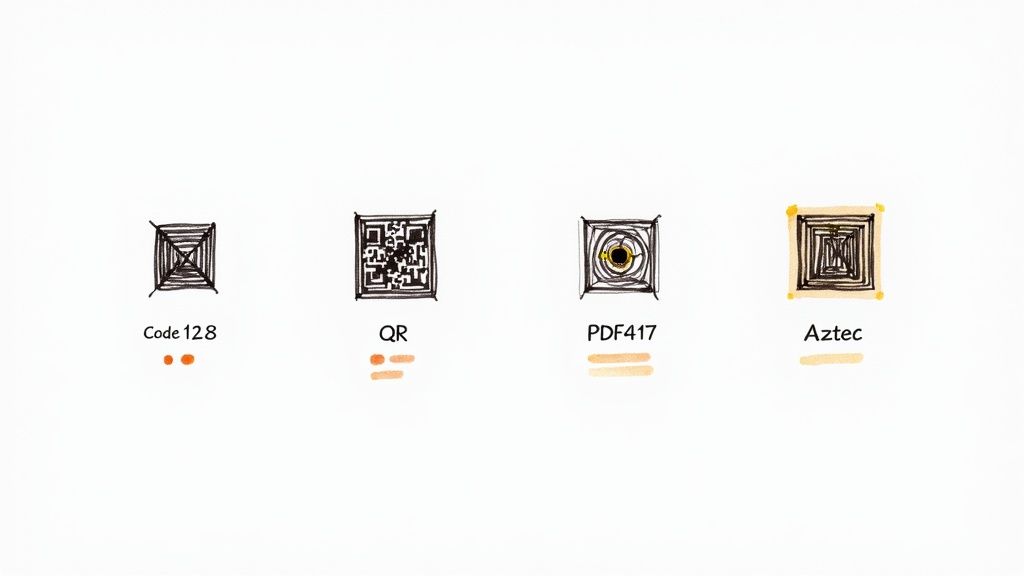
The graphic shows how one-dimensional codes cram a handful of characters while two-dimensional codes hold thousands. Notice the square layout of QR and Aztec—ideal for smartphone cameras.
Comparison of Barcode Types
Below is a quick rundown of how one-dimensional and two-dimensional codes compare. Match capacity, scan speed, and event size to find your best fit.
| Barcode Type | Data Capacity | Scan Time | Best For |
|---|---|---|---|
| Code128 | 10–20 chars | 0.3s | Small runs |
| QR Code | 3,000 chars | 0.8s | Rich mobile passes |
| PDF417 | 1,100 chars | 1s | Secure boarding |
| Aztec | 1,200 chars | 0.8s | Low-light scans |
Use this chart to zero in on your ideal barcode type. Or mix formats across ticket tiers to balance simplicity and detail.
Hands-On Barcode Generation
No coding? No problem. Platforms like Ticketsmith let you create branded barcodes in minutes. Here’s a typical workflow:
Enter your event date and ticket IDs, and pick a barcode symbology.
Upload a logo and choose your color palette.
Export the batch as PNG or PDF at 300 DPI for sharp printing and on-screen legibility.
Before you hit print:
Scan samples with various phone cameras to spot quirks.
Ensure high contrast between the code and its background.
Keep quiet zones clear around each barcode.
Customizing Your Codes
Branding your barcodes makes a big difference at the door. You won’t write a single line of code. Integrate your event logo and theme colors so tickets look cohesive—and guests know they’re in the right place.
Best Ticketing Platform For Events dives deeper into choosing the right software. Here’s the quick pitch: Ticketsmith charges a flat fee with no hidden percentages. Setup takes minutes. Payouts go straight into your account.
Once your codes are generated, you might:
Export a CSV or JSON file for your mailer or badge printer.
Download a ZIP of images paired with a spreadsheet mapping each code to an order.
“I generated five thousand unique barcodes in under ten minutes,” says a workshop host in Portland.
This approach scales smoothly from five to five thousand attendees—no extra IT tickets required.
PNG or JPG image files for print.
CSV with code and order info.
JSON for API integrations.
Test a handful of tickets before distribution to catch any scanning hiccups. Now you know how to generate barcodes for tickets in minutes.
Next, we’ll tackle printing barcoded tickets without wrecking budgets or designs.
Cheers.
Print Barcoded Tickets
Printing your own tickets can feel daunting. I’ve found a sweet spot for short runs that keeps things simple and reliable.
Start by picking cardstock that resists folding and holds ink. Eighty- to one-hundred-pound stock is your friend. I always swap in waterproof cartridges (they run about $20 a set) to dodge smudges. If you’re handing out tickets on the fly, peel-and-stick rolls make life easier. Never skip a quick test sheet. A misaligned barcode means wasted stock.
Paper Weight Guide: Choose 80–100 lb cardstock for durability.
Ink Options: Opt for waterproof cartridges to keep codes crisp.
Template Trim Guides: Align barcodes flush with your margins.
For a detailed layout checklist, dive into our guide on gig ticket printing.
Here’s a side-by-side look at DIY runs versus flat-fee print shops:
| Option | Setup Time | Cost for 100 Tickets |
|---|---|---|
| DIY at Home | 15 minutes | $10 |
| Label Roll Supplier | 1 day | $25 |
| On-Demand Shop | 2 days | $40 |
This table shows when it pays to invest your own time and when it’s smarter to pay a premium.
DIY Printing Options
When you’re under two hundred tickets, feed blank labels through your inkjet. I crank quality to maximum. Zero out margins and leave a 0.25-inch clear border around each code. Scanners love the breathing room.
Below is a screenshot from Zebra showing key printer models.
In my tests, these units hit speeds up to eight inches per second on durable white and clear labels. Thermal prints mean no smudges and zero drying time.
Outsource Print Services
Once you’re ordering above five hundred tickets, I lean on flat-fee shops that handle design, print, and delivery. Rates start around $0.15 per ticket. You can layer in custom branding without extra fuss.
One client got one thousand tickets delivered in two days for $120 flat. They even split shipments—some mailed to VIPs, the rest waiting at will-call. As one local organizer told me:
“We cut printing time by 75% and kept our visuals crisp.”
This approach frees you from paper jams, ink emergencies, and late-night printer runs. Always print a small sample, run it through your scanner, and iron out quirks before the full order arrives.
I often mix methods—peel-and-stick sheets at the door and mailed tickets for VIPs. Keep a digital backup of your PDF files so last-minute reprints or lost tickets don’t derail the show.
Your lean print plan starts now. Enjoy seamless printing.
Scan and Validate Tickets
Getting hundreds or even thousands of guests through the gate without a hitch starts with rock-solid scans. You can deploy fixed kiosks at a turnstile, hand smartphones to staff, or roll out affordable handheld readers. The right mix cuts costs and keeps lines moving.
Camera Kiosks: A USB webcam over a check-in pad lets one person handle dozens of scans.
Mobile Apps: Any smartphone becomes a ticket reader in seconds. Perfect for roaming ushers.
Handheld Readers: Dedicated scanners with a trigger button deliver the fastest reads.
Scanning Workflows
First, plug devices into reliable power and a stable network. Instant logging means duplicate scans show up right away. You can reroute problem tickets before they back up the queue.
If Wi-Fi flakes out, switch your scanner app into offline mode. It caches every scan locally, then syncs once you’re back online.
If you’re using the Ticketsmith dashboard, duplicates flag in real time and all your data streams into one place—no more CSV wrangling after the event.
Network Tips
Large venues deserve a private network. Rent a local router and pair it with an SSD-backed server to cache check-ins on site. Push them to the cloud when the connection holds.
I’ve seen one stadium breeze through sixty thousand scans in under an hour across forty gates this way. Switching to two-dimensional and dynamic barcodes cut fraud by sixty to ninety percent. With 0.8-second scans at each gate, you’re looking at roughly fifteen to twenty checks per minute per entrance. For more on these numbers, dive into our barcode ticket statistics.
Throughput Comparison At Large Venues
Below is a quick look at scan rates under peak conditions. Use this to decide how many devices—and people—you need at each gate.
| Scanner Type | Avg Scan Time | Scans/Minute | Staff Per Gate |
|---|---|---|---|
| Camera Kiosks | 0.7s | 85 | 1 |
| Mobile Apps | 0.8s | 75 | 1 |
| Handheld Readers | 0.5s | 110 | 2 |
| Hybrid Stations | 0.6s | 90 | 2 |
Handheld scanners win on speed. Kiosks let you do more with fewer staff.
Equipment Recommendations
When budgets are tight, I reach for the XYZ handheld scanner. Under $150, it still hits 110 scans per minute.
If you love a DIY challenge, grab a Raspberry Pi and its camera module for about $100 in parts. Instant kiosk.
Don’t forget: your team’s smartphones can double as ticket readers once you install a barcode-scanning app.
“We had check-in live in under ten minutes using only phones and a two-dollar tripod,” a festival organizer shared.
Staffing Guides
Aim for two gates per hundred guests to keep lines flowing. Each gate needs one dedicated scanner and a floater for jams or dead batteries. Clear signage helps guests choose the right line without asking.
Here’s a simple hardware dashboard overview to compare options for throughput and error logs in real time:
Run a full dry rehearsal with real-world crowd sizes the day before. Log average scan times, watch for drift, then tweak staff rotations and gate assignments based on actual data.
Record Scan Metrics: Track time per scan by device.
Rotate Teams: Swap staff every thirty minutes to prevent fatigue.
Backup Plan: Keep a printed guest list handy for manual checks.
Common Mistakes To Avoid
Don’t clog your network with video streams or social posts during check-in.
Give scanners space—they interfere if too close.
Never skip a dry run that mirrors your expected crowd size.
Key Takeaways
Fast Scans keep guests smiling. Offline Fallback stops queues dead when Wi-Fi drops. Real-Time Validation cuts fraud and duplicates cold. Match staffing to these rates, and watch lines move.
Pro tip: disable screen savers and turn off auto-brightness on scanning devices. Test under your lighting conditions. Expect VIPs? Spin up a parallel tablet lane with its own reader. It can cut VIP wait times by fifty percent. All that scan data feeds straight into post-event reports. Iterate and improve for next time.
Ready to make entry your smoothest process yet? Let’s get every barcode and QR code scanning like clockwork.
Secure Tickets Against Fraud
Barcodes are trivial to reproduce. To stop ticket thieves, layer on cryptographic signatures, time-based embeds and instant invalidation. Each code becomes one-and-done, rejecting duplicates on the spot.
Implement Cryptographic Signatures
Signing a barcode for tickets with your private key embeds proof right in the payload. The moment someone scans, your server checks that signature—usually in a few milliseconds.
Create a public/private key pair.
Attach a digital signature to each code.
Validate the signature during scanning.
Embed Timestamps And Watermarks
Tying a ticket to a specific time makes it useless once the moment passes. Invisible watermarks (on paper or screen) reinforce that link so any replay after the timestamp fails.
Add a UTC timestamp to the data string.
Use hidden watermarks in print and mobile codes.
Enforce an expiry window around your event.
| Technique | Setup Time | Effectiveness |
|---|---|---|
| Crypto Signatures | 2 minutes | High |
| Timestamp Embeds | 1 minute | Medium |
| Rolling Invalidation | 3 minutes | Very High |
All of this plugs together in minutes—no coding required. Custom branding included and you pay a flat fee on one platform.
Use Rolling Invalidation
Once a code is scanned, it’s history. That blocks screenshots and last-minute resells.
Scan triggers a call to your server.
Server checks if the code is fresh.
Server marks the code as used.
Key Insight Fraud drops by eighty percent when each code can’t be scanned twice in real time.
Manage Attendee Data Safely
GDPR and other privacy rules aren’t optional. Keep only what you need and purge it on schedule. Skip this, and you risk fines.
Gather name and email only when required.
Encrypt information at rest and in transit.
Erase personal data after six months by default.
Check out our guide on preventing ticket scalping for more best practices.
Deliver barcodes via mobile-only links or integrate them into mobile wallets. This shuts down any chance of someone grabbing a JPEG and sharing it.
A small community cinema tried this over three showings and saw fraud fall to zero. Entry scanning averaged under one second per guest.
Follow these measures to stop fake tickets without slowing down real attendees. Real-time checks reject fakes fast. Mobile delivery means no paper to juggle.
With a system built for passionate event organizers, you’ll lock down tickets in minutes. You pay flat fees and receive payouts right away. It works for five to five thousand attendees and keeps queues moving at the gate.
Zero IT required. Ticketsmith handles everything from dashboard setup to flat-rate payouts—no hidden fees.
A real-world test at a pop-up weekend saw zero duplicate entries and a thirty percent faster check-in. Try these steps and watch fraud vanish while your crowd stays happy.
Tips for Small Event Organizers
You’re juggling a hundred hats. Ticketing shouldn’t be one of them. Matching your ticket design to your event boosts your brand and cuts confusion at the door.
Look for a no-code platform that scales from five to five thousand attendees. Most services let you upload a logo, pick colors, and be ready to sell in minutes. Flat fees and speedy payouts are bonus.
I once saw a pop-up chef in Austin go live in under fifteen minutes. She swapped in her logo, tweaked her colors, and emailed barcoded tickets before lunch.
Automating payouts frees you for the parts of event planning you enjoy. No hidden cuts. You see 100 percent of your ticket revenue land in your bank account.
Quick Printer And Scanner Combos
You don’t need a warehouse of gear. These wallet-friendly setups handle small runs and on-the-fly printing:
Canon Pixma TS6350 for under $100.
Brother QL label printer with peel-and-stick labels.
Raspberry Pi kiosk loaded with its camera module.
“When my Wi-Fi crashed, I switched to my phone’s hotspot and kept scanning,” says a workshop host in Portland.
Offline-capable scanner apps cache valid entries and sync later. That trick kept one fitness instructor’s check-in line moving when the venue’s network died.
Go-To Tech Troubleshooting
Before doors open, run a quick dress rehearsal with every device. Test scanning in dim corners and check barcode contrast. Leave at least half-inch quiet zones around each code.
If the scanner hiccups, start by verifying contrast and margins. Then use these fast fixes:
Keep a printed backup list of codes for manual check-ins.
Stash power banks to keep scanners—and phones—powered.
Create a one-page cheat sheet of common error codes.
Always run a mini rehearsal to catch surprises early.
Frequently Asked Questions
Can QR codes work without an internet connection?
You don’t need a live network once your scanning app has preloaded a batch of valid codes. Even if Wi-Fi or cellular drops, your team can breeze through check-in without missing a beat.
How do I refund a ticket that’s already been scanned?
Just hit “void” next to the original barcode in your dashboard. Then generate a fresh code and send an automated email to your guest—no wrestling with spreadsheets.
What happens when a barcode refuses to scan at the gate?
Check your printer’s ink contrast first. Adjust the scanning device’s angle if you need to. If that doesn’t help, flip to manual lookup with your backup list. Keeping both a printed code roster and a guest directory will save the day.
Is mailing physical tickets still a good idea?
Absolutely. Print on 80 lb cardstock and choose waterproof ink to guard against smudges. Ship via a tracked service and slip them inside foam-padded mailers for extra protection.
Offline Fallback Modes
Prime each scanner with a batch of verified codes ahead of time.
Reconcile and sync scan data when you’re back online.
Drill staff on toggling between modes in a flash.
“Offline scans saved us during a venue blackout,” says a festival organizer who handled three thousand attendees.