
Trying to log in to Eventbrite should be a five-second job. Pop over to their site, type your email and password, and you're in. If you signed up with Google, Facebook, or Apple, just click that button. Easy.
So why does it sometimes feel like you're trying to solve a puzzle just to check your ticket sales? Let's get you in without the headache.
Getting Past the Front Door
You’ve got sales to check or an event detail that needs a tiny update. First, the login screen. It should be simple, yet sometimes it feels like finding the right key on a giant keychain.
Let’s get you in without the fuss.
- On a Desktop: You’ll see the email and password fields right away. The social login buttons are there too. They're a real time-saver if you've set them up.
- On the Mobile App: It's a cleaner layout. You tap to log in and see the same options. It’s built for quick access when you're out and about.
Your Login Options
Most people use an email and password. It works. But a social login can make your life easier. Using Google, Facebook, or Apple means they vouch for you. No need to remember another password.
Just remember your account is tied to that social profile. If you lose access to your Facebook account, you might have a hard time getting into Eventbrite. It's the classic trade-off: convenience versus direct control.
For so many creators—from pop-up chefs to workshop hosts—the login screen is just a barrier. The goal is to make this step forgettable so you can focus on creating an experience people will remember.
Your ticketing platform shouldn't make things complicated. While the Eventbrite login is usually fine, some organizers prefer simpler tools. As you get into your account, it's worth asking if your tools are really working for you.
If you're curious about simpler setups, you can explore some Eventbrite alternatives. We think getting started should take minutes, not manuals.
What to Do When Your Eventbrite Login Fails
It's one of the most frustrating moments. You know you typed the right password, but the login screen says no.
Before you consider throwing your laptop out a window, let's walk through the actual fixes. Most of the time, the solution is much simpler than you think.
Pinpointing the Problem
First, let's figure out why your Eventbrite login is hitting a wall. Is it a forgotten password, or something trickier like a glitch with your social media connection? This quick decision map can help you figure out your next move.
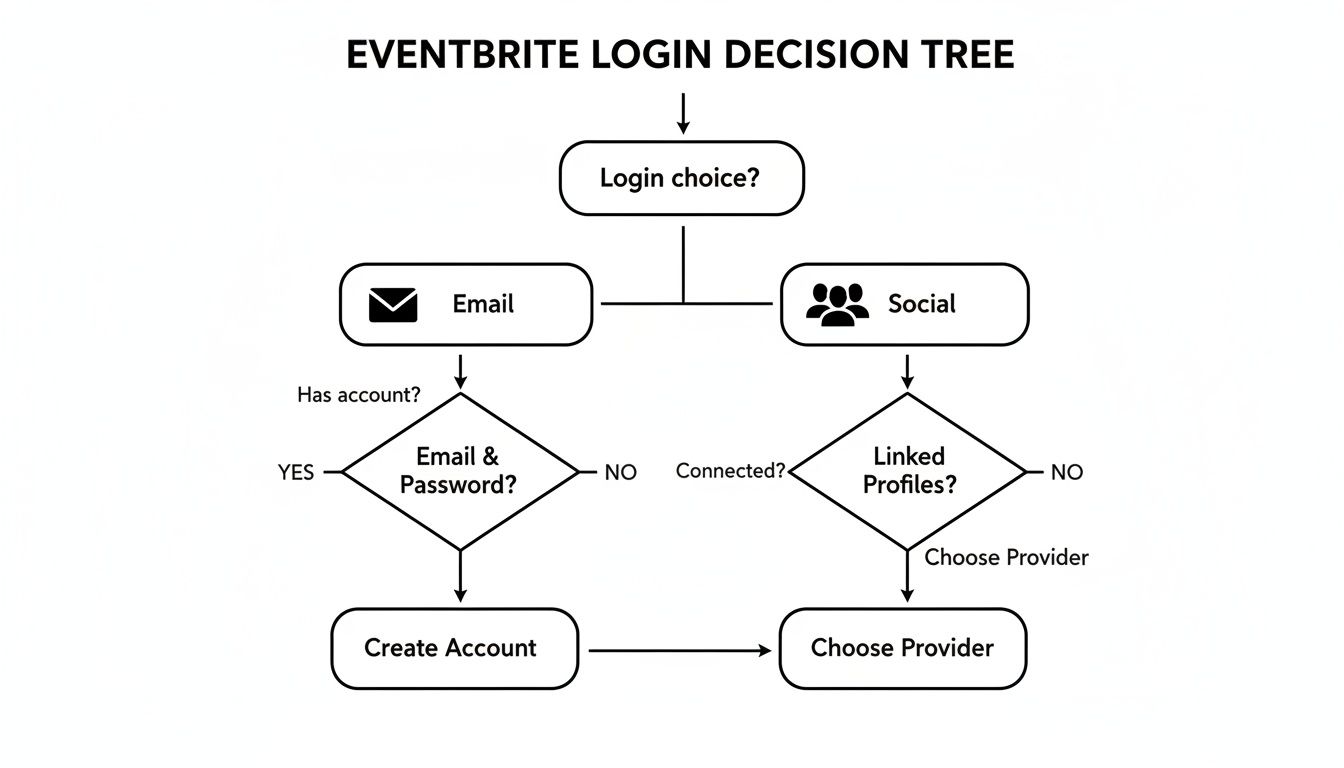
This chart breaks down the two main login paths—email or social account—and points you toward the right solution.
Often, the culprit is a typo or the wrong email. Give it another shot. Double-check for typos and make sure your caps lock isn't on. If that fails, the "Forgot Password?" link is your best friend. Click it, enter your email, and Eventbrite will send reset instructions.
But what if the email never shows up? Check your spam folder. Automated emails get lost in there all the time. If it's still missing, you might have signed up with a different email. Try any others you use.
When Social Logins Go Sideways
Using Google or Facebook to log in feels like a great shortcut. Until it doesn't. When a social login fails, the issue is often the connection between platforms, not Eventbrite itself.
First, open a new tab and log directly into your Google or Facebook account. This confirms you have the right password. Then head back to Eventbrite and try again. Sometimes, re-authenticating the connection is all it takes. Clearing your browser's cache can also solve those weird login loops.
Common Eventbrite Login Problems and How to Fix Them
Here's a quick reference for figuring out why you're stuck and what to do next.
| Problem You're Seeing | What It Likely Means | Your First Move |
|---|---|---|
| "Incorrect password" message | A typo, wrong password, or caps lock is on. | Carefully re-enter your password. If it fails, use the "Forgot Password?" link. |
| The password reset email never arrives | It's in your spam folder or you're checking the wrong email account. | Check spam. If it's not there, try the reset process with other emails you own. |
| Social login (Google/Facebook) fails | The connection needs re-authenticating or there's a browser cache issue. | Log in to your social account in a separate tab first, then try again. If that fails, clear your browser cache. |
| Page keeps reloading in a loop | This is often a browser or cookie problem. | Clear your browser's cache and cookies. Then close and reopen your browser before trying again. |
Most login headaches are solved with these quick fixes. But if you're constantly fighting with your account, it might be a symptom of a larger problem.
Your ticketing platform should make life easier, not create another password to forget. The moment you spend more time logging in than managing your event is a good time to ask if your tools are really working for you.
For many workshop hosts and local organizers, a simple login is essential. If you find yourself wrestling with account issues, it might be a sign to look for an alternative to Eventbrite that puts simplicity first. We believe setup should take minutes, with flat fees and no hidden percentage skims.
Keeping Your Eventbrite Account Secure
Your Eventbrite account holds your attendee lists, financial info, and all your hard work. Keeping that data safe isn't just a good idea. It's essential. The good news is you don't need a cybersecurity degree to lock things down.

The single best thing you can do is enable two-factor authentication (2FA). It sounds technical, but it’s simple. After you type your password, Eventbrite asks for a second piece of proof. Usually, it's a code sent to your phone.
Think of it this way: your password is the key to your front door. 2FA is the deadbolt on the inside. A thief might pick the first lock, but they'll have a much tougher time getting past the second one. Seriously, turn it on.
A Quick Look at SSO
If you manage a large event with a team, you might see the term Single Sign-On (SSO). In plain English, SSO lets your team use one set of credentials—like their company email—to log into multiple platforms, including Eventbrite.
This makes managing access a breeze. When someone leaves, you can revoke their access to everything at once. It's less about one person's account and more about streamlining security for a whole organization. For a solo host, it's overkill. For a growing festival crew, it's a lifesaver.
Security is about adding simple layers of protection so you can focus on your event, not on who’s trying to get into your account. A few minutes setting up 2FA can save you a world of headaches.
A secure login protects your data. A solid ticketing process protects your attendees' experience. To see how tech keeps entry lines moving, you can learn how a barcode for tickets keeps the process smooth and secure. It’s another one of those small details that makes a big difference.
What to Check After You Log In
You’re in. Now what? Once you're past the Eventbrite login, you land on your dashboard. This is mission control. A quick look at a few key spots tells you everything you need to know without getting lost.
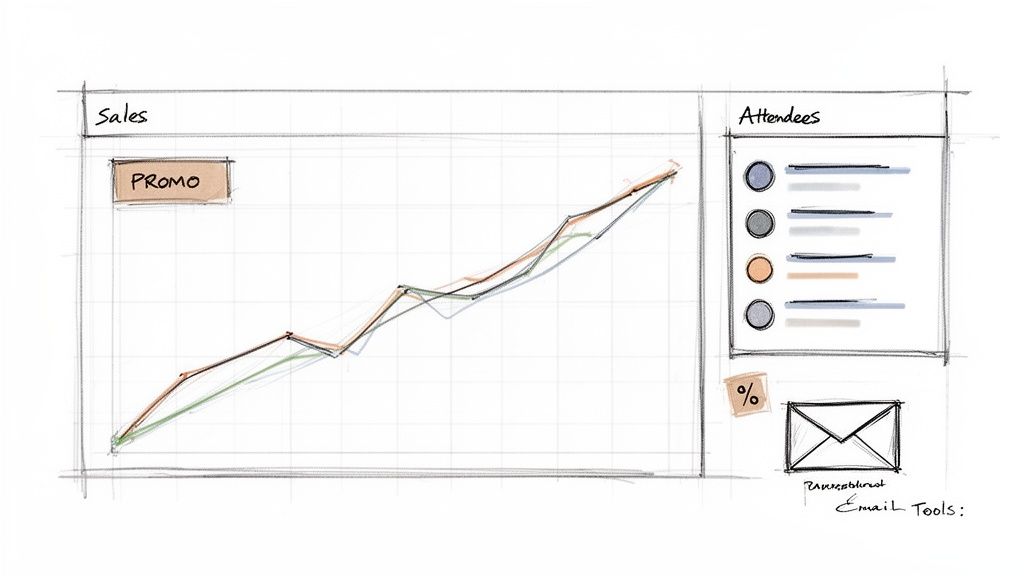
Your first stop should be the sales summary. Think of it as your event’s pulse. Are sales ticking along, or did they jump after that email you sent? This isn't just a number to make you feel good. It's direct feedback on what’s working.
Next, check your attendee list. Seeing names roll in is a great feeling. But this list is also a practical tool. You can export it, see who bought which ticket, and start planning your check-in strategy.
Finding the Real Insights
Beyond basic numbers, the real magic is in the marketing tools. This is where you see which channels drive ticket sales. You can create promo codes or send emails to your followers. It’s all right there.
These tools are more powerful than you might think. For small events, a well-timed promo code can double views and boost sales by 15%. Good emails to your followers can hit a 59% open rate, which is unheard of in most industries.
Your dashboard is more than a bunch of charts. It’s a feedback loop. It tells you what your audience responds to, helping you make smarter decisions for your next event without needing a marketing degree.
For independent creators, this direct feedback is everything. It helps you focus your limited time and energy where it truly counts.
Speaking of focus, once your event details are set, you'll need to create the actual tickets. We've got a simple guide on how to create tickets for an event to make it easy.
Is Your Ticketing Platform Actually Helping You?
Getting logged into your event platform should be the easiest part of your day. If you’re constantly fighting with your tools just to get in, maybe it's time to ask a bigger question: Is this setup actually helping me?
For a lot of independent creators, complex platforms with fees hiding in the fine print slowly drain energy and profits. A 5% cut here, a $0.99 fee there—it adds up fast. This isn’t about trashing what you’re using. It's a gentle nudge to consider what you really need from a partner.
What Simplicity Looks Like
Imagine a world without percentage-based fees. Instead, you pay a simple, flat fee per ticket. Your event page has your branding, not someone else's. And setting it up takes minutes, not a user manual and three cups of coffee.
This isn’t a fantasy. It’s about choosing tools built for real people pouring their hearts into events, whether it’s for five attendees or five thousand.
Your ticketing partner should make your life easier. The goal is fast, secure payouts and a system so simple you forget it’s even there. It’s about focusing on your event, not wrestling with a dashboard.
A great platform improves the whole attendee experience. The same logic for a smooth login applies to managing the crowd at your door. For instance, understanding what a queue management system is and how it improves customer flow offers great insights. A seamless process makes your brand look good.
The best tools get out of your way. They give you control over your branding, your money, and your time. If your current platform isn't doing that, it's good to know you have other options.
Got Questions? We've Got Answers
Stuck on a tricky login or just curious about how your Eventbrite account works? You're not alone. These are some of the most common questions we see. Let's get them answered.
How Do I Merge Two Different Eventbrite Accounts?
Short answer: You can't. At least, not with one click. Eventbrite doesn't have a feature to combine two accounts.
Your best bet is a manual fix. Pick one account to be your primary one. Then, recreate any upcoming events from the second account into your main one. It takes a little effort, but consolidating lets you close the extra account and keep things clean.
Can I Change the Email Address for My Eventbrite Login?
Absolutely. Once you're logged in, go to your "Account Settings." You'll see an option to change the email address.
Eventbrite will send a verification email to the new address. Click the link inside, and you're all set. Your new email is your login from now on.
I Signed Up with Google—How Do I Create a Password?
This is a common one. When you sign up with a social login like Google, Eventbrite doesn't create a separate password for you. It authenticates you through your Google account instead.
If you want a dedicated Eventbrite password, you have to nudge the system. First, log out completely. Then, go to the login page and click the "Forgot Password?" link. Enter the email address tied to your Google account. This will trigger the password reset process, letting you create a password you can use directly.
Your ticketing platform shouldn't feel like a puzzle. Good software makes account management simple, letting you focus on creating a killer event.
Can Multiple Users Access the Same Eventbrite Account?
Yes, and for teams, this is a lifesaver. Eventbrite supports multi-user access through its "Organization Settings." The account owner can invite team members and give them specific roles and permissions.
This is much better than sharing your personal login. It lets your team manage events and pull reports securely, while you keep full control. It's overkill for a solo creator, but essential for a growing business.
If you're done wrestling with complicated settings and surprise fees, maybe it’s time for something simpler. Ticketsmith is built for people who just want to sell tickets and get paid. Launch your event in minutes, keep your branding, and take home more of your revenue with our simple flat-fee pricing.
See how easy ticketing can be at https://ticketsmith.co.