
So, you need to organize an event, but you don't have a big budget for fancy software. You stumble upon something called "free event management software." What's the deal?
Think of it as the basic toolkit for getting an event page live, managing RSVPs, and keeping track of who’s coming. It’s often just enough to get your first workshop or pop-up off the ground.
What Is Free Event Management Software Anyway?
You’ve got a killer idea for a pop-up dinner, a weekend yoga workshop, or a local craft market. The vision is there. You just need a way to manage it all without spending money you don't have.
This is where free event management software swoops in. It promises a simple solution. A quick way to spin up a page, let people sign up, and see who's coming. And for the most part, that’s true.
You can often get set up in minutes, no code needed, and start collecting registrations right away.
The "Free Website Builder" Analogy
It’s a lot like a free website builder. You get a solid foundation for your event page, which is great for getting started. You can publish your details, create a sign-up form, and manage a basic attendee list.
It's perfect for testing an idea or running a small, straightforward event.
But just like with a free website, you hit walls the moment you want to make it truly yours. Want to add your own custom branding? That'll cost you. Need to remove their logo from your page? That's an upgrade.
This model is popular for a reason, especially with small organizers. Small and medium businesses made up 64.24% of the event software market in 2024. Many start on free tools. This trend is fueling a projected 12.61% growth as more creators scale up. You can explore more data on this SMB adoption trend.
What You Usually Get for Free (And What You Don't)
So, what can you really expect from a "free" plan? The core functions are usually pretty solid. You’re not getting a powerhouse, but you are getting the essentials.
Most free plans nail the basics:
- A Basic Event Page: A simple, templated page where you list your event's what, when, and where.
- Simple Registration Forms: Enough to collect names and email addresses.
- Attendee List Management: One place to see who has signed up.
- Free Ticket Handling: If your event is free, the platform is almost always free to use.
These tools handle the grunt work so you can focus on creating an amazing experience. They work great for a five-person art class. But you have to know the limits.
What 'Free' Usually Means vs. What You Actually Need
Here's where the "free" model starts to show its cracks. The features you get don't always match the features that help small creators thrive.
| Feature | Included in Most 'Free' Plans? | Why It Matters for Your Event |
|---|---|---|
| Custom Branding | Almost never | Your event should look like your brand, not the software's. |
| Sell Paid Tickets | Yes, but with fees | "Free" for you, but they take a cut from your ticket sales (often 5-10%). |
| Custom Form Questions | Limited or not included | You can't ask about dietary needs or t-shirt sizes without upgrading. |
| Email Communication | Basic confirmation only | Need to send reminders? You'll likely need to pay or use another tool. |
| Embeddable Widgets | Rarely | Want to sell tickets directly from your own website? This is a premium feature. |
| No Platform Ads | Definitely not | Your event page will promote the software company, distracting your attendees. |
The "free" path gets you in the door. But the features that create a professional, seamless experience are almost always locked behind a paywall.
The Real Price Tag of 'Free' Software

Let's be honest. Nothing is ever truly free. That "free" software makes money by taking a slice of your revenue.
I'm not talking about upgrade fees for premium features. I mean the sneaky costs buried in the fine print.
The biggest culprit? Percentage-based ticket fees. Platforms promise "free to use," but the moment you sell a ticket, they skim a percentage right off the top. It might sound small, maybe 3% or 5%. But it adds up fast.
Then there are the "service fees" they pass on to your attendees. This makes your event look more expensive. Your guest sees one price on your page and a higher one at checkout. It feels deceptive, even though it's the platform's doing.
The Math Doesn't Lie
Let's run a quick example. Imagine you’re a pop-up chef hosting a dinner.
You’re selling 50 tickets at $75 each. That’s $3,750 in revenue. A typical "free" platform might take a 5% cut plus a $1 fee per ticket.
- Platform Fee: (5% of $3,750) + ($1 x 50 tickets) = $187.50 + $50 = $237.50
- Payment Processor Fee: Standard credit card fees are around 2.9% + $0.30 per transaction. That’s another $123.75.
- Total Cost: Your "free" software just cost you $361.25.
Suddenly, that free tool isn't so free. This is money that should be going toward your ingredients, venue, or your own pocket. For people pouring their hearts into their work, this feels like a punch in the gut. Compare this with a simple, flat-fee model where you know the exact cost upfront.
More Than Just Money
The costs aren't just financial. Your time and brand are on the line, too.
Free tools can be a false economy. You save money upfront but pay for it with your time, your brand, and a chunk of every ticket you sell.
Clunky tools make simple tasks a chore. And when the platform plasters its logo all over your beautiful page, it cheapens the experience. It tells your attendees you're using a freebie tool, which can damage your professional image. For a deeper look, our guide on free event planning software covers other hidden trade-offs.
While free software can reduce manual work by up to 70%, the free tiers often lack robust ticketing that sends funds straight to you. Instead, those hefty service fees eat into your profits. You can read more on the ticketing integration gap. The goal is to find a tool that supports your growth, not one that penalizes you for it.
What Small Creators Actually Need (Forget the Feature Bloat)
Alright, let's get real for a minute. Most event software is built for massive conferences with a million features you'll never touch.
But if you're running a pop-up dinner, a weekend workshop, or a local market, your world is completely different. You aren't managing a thousand-person trade show. You're pouring your heart into creating something special.
So, forget the endless list of features. Your success comes down to a few key things. This isn't about finding the tool with the most bells and whistles. It’s about finding one with the right features that gets out of your way.
Your Brand, Not Theirs
First, your event page needs to look and feel like your event. It’s amazing how many free platforms plaster their own logos all over your page. It practically screams "I'm using a free tool," which can make your event feel less professional.
You need a tool that offers simple custom branding. Look for the ability to upload your logo and pick your brand colors. It’s a small detail with a huge impact. It builds trust and makes the whole experience feel cohesive. This should take minutes to set up, no code required.
Fast, Secure Payouts
Okay, let's talk money. After the event is over, you shouldn't have to wonder where your ticket revenue is. Waiting on payouts is stressful, especially when you have bills to pay.
This part is non-negotiable. You need fast, secure payouts that land directly in your bank account. A solid platform will deposit your earnings within a few business days. This one feature lets you focus on planning your next event instead of chasing your own money. If a platform is vague about its payout schedule, run.
Simple, Honest Fees
This is the big one. As we've covered, "free" is rarely free when you're selling tickets. Many platforms survive by taking a percentage of your revenue, which penalizes you for success.
For small creators, a simple, flat-fee pricing model is almost always better. You pay a predictable, tiny fee for each ticket you sell. That’s it. No hidden percentage skims. No confusing service charges. That transparency means you can set your ticket price knowing exactly how much you'll take home.
After all, knowing your numbers is key. You can explore some great strategies to effectively measure event success, and any tool you choose should make this easy. It's one of many simple things we dive into in our event management tips for beginners. You need a partner that supports an event for five people or five thousand with the same honest approach.
When Does It Make Sense to Use Free Software?
Look, I'm not here to say every piece of free software is a trap. Sometimes, it's exactly the right tool for the job. The trick is knowing when your situation fits the bill. It's about matching the tool to the task, not forcing your event to fit the limits of a free plan.
Hosting a free community meetup where you just need a headcount? Free software is your best friend. Testing the waters with your very first workshop for five people? Absolutely, go for it.
In these cases, your goal isn't making money. It's about validation. You need a fast, zero-cost way to track RSVPs and see if your idea has legs.
The Low-Stakes Litmus Test
Free tools shine when the stakes are low. Think of it as a litmus test for your event concept. If you aren't charging for tickets and your main goal is to gather a group of people, a free plan does exactly what you need.
Here are a few moments where "free" is the smart move:
- Free Community Events: Book clubs, neighborhood cleanups, or casual meetups.
- Testing a New Idea: That first-ever five-person pottery class. See if anyone is interested before you scale up.
- Internal Team Gatherings: Organizing a casual get-together for your small team.
- Personal Events: Planning a birthday party and just wanting an easy way for people to RSVP.
This flowchart breaks down the simple decision tree many small creators face. It's all about what you prioritize.
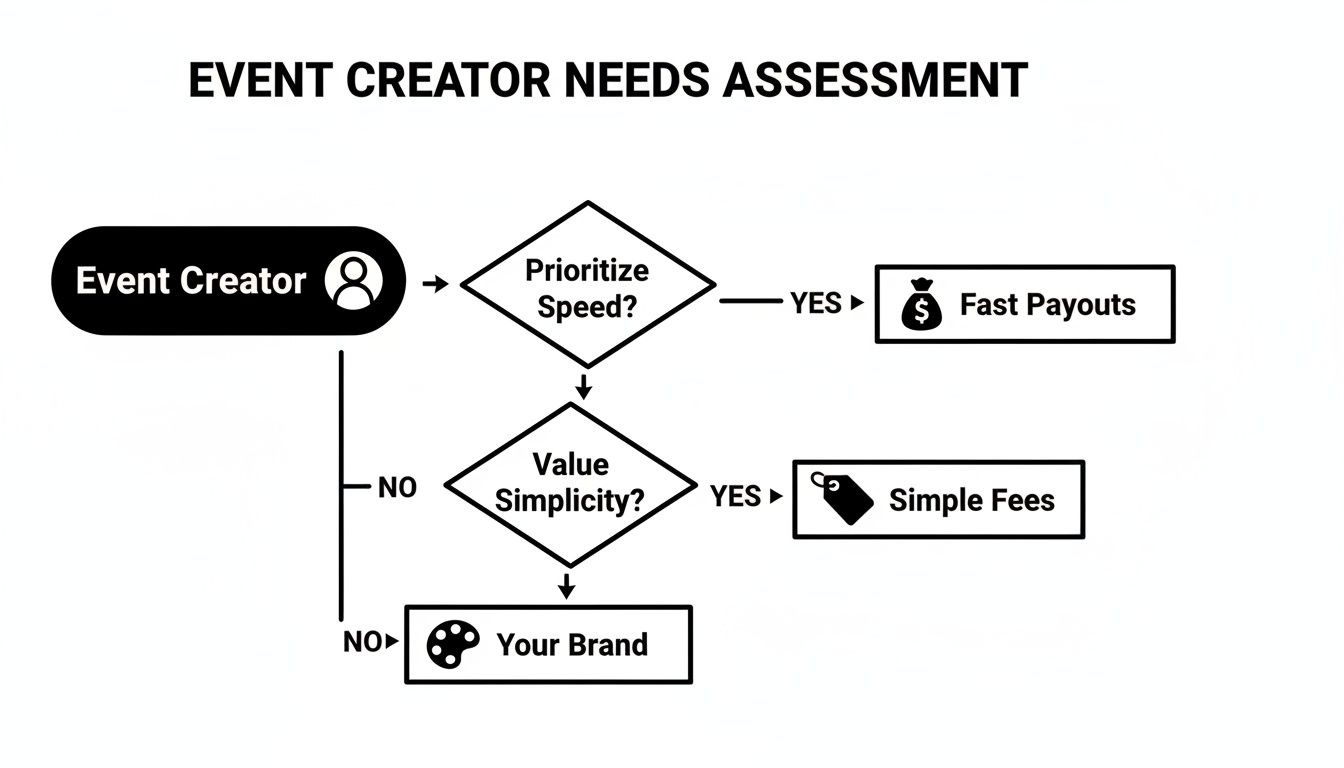
As you can see, your core needs should guide you to the right kind of solution from the start.
When You've Outgrown "Free"
The warning signs are usually obvious. They pop up as frustrating little roadblocks that eat your time and energy.
If you're manually reconciling ticket fees in a spreadsheet or fighting a platform that won't let you put your own logo on the page, it’s probably time to move on.
This journey is common. The global event software market is projected to jump from $17 billion in 2025 to $82.3 billion by 2035. A big reason is that free tiers are a crucial entry point for organizers. As their events grow, they naturally graduate to paid plans that offer more control. You can learn more about these event market trends.
The moment your event becomes a real business, even a tiny one, you need a tool built for business. That means custom branding, fast payouts, and a simple fee structure that doesn't punish you for selling more tickets.
Your No-Nonsense Evaluation Checklist
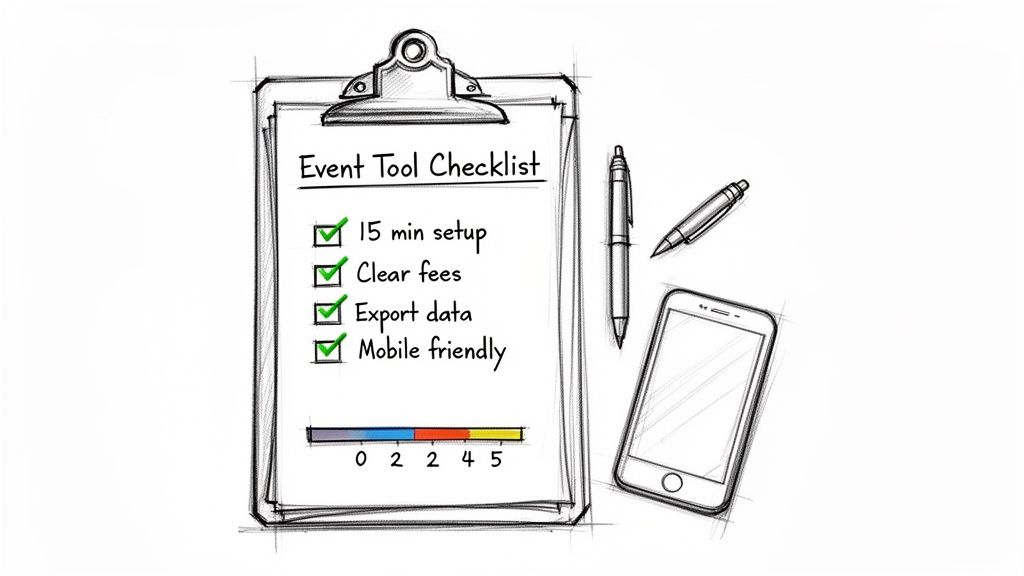
Feeling overwhelmed by the options? Let's fix that. Picking the right free event software shouldn't be like studying for an exam. It’s about asking a few sharp questions to cut through the marketing noise.
Think of this as your shield against confusing features and sneaky fees. It’s built to help you find tools that are actually for people like you—the workshop hosts, pop-up chefs, and community builders.
This isn’t about finding the platform with the most buttons. It’s about finding the one that gets out of your way.
The Five-Minute Sanity Check
Before you sign up for anything, run any potential tool through these questions. If you can't get a clear "yes" on all of them, just keep looking.
- Can I set it up in under 15 minutes without calling for help? Your time is precious. A good tool respects that. You should get an event page live in the time it takes to make a coffee. No code, no chaos.
- Are all the fees listed clearly on the pricing page? Look for radical transparency. If they bury percentage fees in the fine print, what else are they hiding? A simple, flat fee is always easier to plan around.
- Can I make it look like my brand? Your event page should feel like your event, not a giant ad for the software. Basic branding—your logo, your colors—is a must.
- Does it actually work on a phone? Most of your attendees will buy tickets on their phones. If the checkout flow is clunky on mobile, you will lose sales. Test it yourself before you commit.
The best tools feel like a natural extension of your brand. They don't force you into a box; they give you a better box to build with.
Digging a Little Deeper
Once a tool passes that first check, look at the details that really matter for a small event creator. These are the things that separate a decent tool from a great one.
A useful way to approach this is to score each platform on a scale of one to five for each point. You can get more detail on this method in our guide to choosing the best ticketing platform for events.
- Data Portability: Can you easily download your attendee data (names, emails) into a simple CSV file? Your attendee list is one of your biggest assets. You need to own it.
- Payout Speed: How quickly does the money from ticket sales land in your bank account? Waiting weeks for a payout is a cash flow nightmare. Look for fast, secure payouts within a few business days.
Beyond software, a solid plan makes an event successful. For example, if you were organizing a wedding, an ultimate wedding planning checklist is your best friend. The same logic applies here. Your checklist ensures you don't miss a critical step.
Your Event Software Evaluation Checklist
To make this even easier, use this quick scorecard. It helps you compare platforms apples-to-apples, focusing on what actually impacts your event.
| Question to Ask | Why It Matters | Tool 1 Score (1-5) | Tool 2 Score (1-5) |
|---|---|---|---|
| Ease of Setup: Can I go live in under 15 minutes? | Your time is limited. You need a tool that works instantly, without a steep learning curve. | ||
| Fee Transparency: Is every single cost listed upfront? | Hidden fees destroy your budget and trust. You need predictable, clear pricing. | ||
| Mobile Experience: Is the checkout smooth on a phone? | A bad mobile experience directly leads to lost sales and frustrated attendees. | ||
| Brand Customization: Can I add my own logo and colors? | Professionalism builds trust. Your event page should reflect your brand, not the tool’s. | ||
| Payout Speed: How fast will I get my money? | Cash flow is king. Waiting weeks for your ticket revenue can strain your operations. | ||
| Data Ownership: Can I easily export my attendee list? | Your community is your asset. You should always have full control of your data. | ||
| Total Score: |
After you score a few options, the right choice often becomes obvious. It's usually not the one with the most features, but the one that scores highest on the fundamentals that support a small event.
So, What Now?
You’ve made it through the jungle of "free" event management software. You know the good, the bad, and the genuinely frustrating parts. The big question is, what’s next?
If you've been nodding along, thinking there has to be a simpler, more honest way, you’re in the right place.
Let’s be real. Many "free" tools cost you in ways that are far from free. Sneaky percentage fees skim off your revenue. Their logos are plastered all over your event page. Confusing dashboards eat up your time. For anyone pouring their heart into an event, that just doesn’t feel right.
It’s exactly why we built Ticketsmith.
There’s a Better Way
We’re not another platform that lures you in with "free" only to hit you with hidden costs. We built a simple, honest alternative: flat-fee pricing. You pay a tiny, predictable fee per ticket. That’s it.
No surprises. No complicated math. And definitely no percentage cuts that punish you for selling out.
Our whole platform is designed for real people who just need things to work.
- Set Up in Minutes: Seriously. You can get your event page live before your coffee gets cold. No code needed.
- Your Brand, Front and Center: It looks like your event because it is your event. Your logo, your colors.
- Get Paid Fast: Your money goes straight to your bank account. Securely and quickly.
This straightforward approach is catching on. More organizers realize that while free tiers are a decent start, they often lead to paid platforms with better features and a lower total cost. The latest event software market report shows the data behind this shift.
If you’re tired of hidden fees and clunky software and just want ticketing that supports you, from five attendees to five thousand, maybe it's time for a change. We put together a complete guide on how to sell tickets online for an event that breaks down how simple it can be.
Got Questions? Let's Get Them Answered.
You're not the only one with questions. It's smart to dig into the details. Here are some of the most common things we hear from organizers, with some straight-up answers.
Can I Actually Sell Tickets with "Free" Software?
Yes, almost always. But this is the big catch. Most "free" event management software isn't free for paid events. The platform is free for you to set up, but they'll take a service fee—usually a percentage—from every ticket you sell.
So, while you don't pay anything upfront, the software gets paid from your revenue. You must find the fine print and understand their exact cut. You also need to check if they pile extra processing fees on top of that for your attendees.
How Many People Can I Have at My Event on a Free Plan?
This is all over the map. Some platforms cap you at a tiny number, maybe 25 or 50 attendees, before hitting a paywall. Others are more generous, letting you manage hundreds, but only if you aren't charging for tickets.
If you're hosting a free community block party, the limits are much higher. But the second you sell tickets, the rules change. The cap is often tied to the number of paid tickets you can sell before they force you onto a pricier plan. Always check the pricing page for the hard numbers.
Will My Event Page Look Like My Brand?
Honestly? Probably not. This is one of the biggest trade-offs. Free software almost guarantees a lack of custom branding. Your event page, confirmation emails, and even the tickets themselves will likely be plastered with the platform’s logo.
It's how they market themselves. By using your event as a billboard. If you want a page that looks and feels like it’s yours, you’ll have to open your wallet. For creators who've poured their hearts into a distinct brand, this is often the dealbreaker that makes a simple, flat-fee tool a much better fit.